01
Fast code identification
Translate a numeric response into a recognizable status name and class.
Start typing to search 227 tools.
Look up common HTTP response codes and use detailed guides for 301, 302, 401, 403, 404, 429, 500, 502, and 503 errors.
HTTP Status Code Lookup explains response codes returned by websites, APIs, proxies, CDNs, and application servers. Enter a code such as 301, 404, 429, or 503 to see its standard name, response class, and concise meaning.
The reference below provides dedicated troubleshooting sections for the redirect codes 301 and 302, authentication and authorization codes 401 and 403, the 404 missing-resource response, the 429 rate-limit response, and the common 500, 502, and 503 server failures.
A status code is only one part of an HTTP response. Review the request method, response headers and body, authentication, caching, redirects, infrastructure, and logs before deciding on a fix.
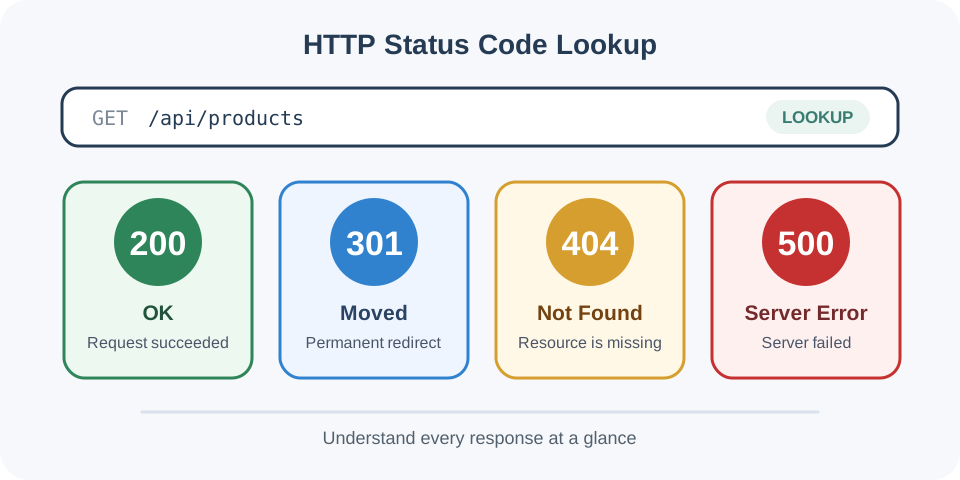
Focused controls, predictable output, and a workflow designed around this exact transformation.
Translate a numeric response into a recognizable status name and class.
Distinguish informational, successful, redirect, client-error, and server-error responses.
Use the explanation to choose the next request, log, or configuration to inspect.
Check common and less familiar codes without searching through unrelated documentation.
Practical details about input, output, privacy, limits, and the best way to use this tool.
The current catalog covers 18 common codes: 100, 200, 201, 204, 301, 302, 304, 400, 401, 403, 404, 409, 422, 429, 500, 502, 503, and 504.
No. It reports HTTP-level success. The body may still contain an application error or an unexpected result.
401 normally means authentication is required or invalid. 403 means the server understood the request but refuses it.
No. It may be missing, removed, hidden by an authorization policy, or requested through the wrong route.
Check the Location header, cache behavior, request method, and every hop in the redirect chain.
No. Correlate the response with application, proxy, infrastructure, and upstream logs.
The input may be syntactically valid but absent from the current common-code catalog.
RFC 9110 defines HTTP semantics; additional status codes may be registered or defined by other standards.
What each status class means, which codes are cacheable, and how redirects, client errors and server errors differ in practice.
Inspect the Location header and confirm the destination is final, canonical, and free of redirect chains.
301
301 Moved Permanently · 3xx · The resource has a permanent new URL.
Check the requested path, routing, deployment, internal links, and whether a redirect or 410 response is more accurate.
404
404 Not Found · 4xx · The requested resource was not found.
Honor Retry-After when present and use bounded exponential backoff instead of immediate repeated requests.
429
429 Too Many Requests · 4xx · The client exceeded a rate limit.
Check maintenance state, capacity, dependency health, load-balancer checks, and Retry-After.
503
503 Service Unavailable · 5xx · The service is temporarily unavailable.
Codes from 100 to 199 are informational, 200 to 299 indicate HTTP-level success, 300 to 399 control redirection, 400 to 499 describe conditions associated with the request, and 500 to 599 indicate that the server failed to fulfill an apparently valid request. The class narrows the investigation, but the exact code, method, headers, body, and server context determine the next step.
A successful code does not prove business success. An API can return 200 OK with an application-level error in the body, while 204 No Content intentionally contains no response body. Diagnose the complete exchange rather than treating every non-200 result as the same failure.
301 Moved Permanently tells the client that the resource has a new permanent URI, normally supplied in the Location header. Browsers, caches, crawlers, and search engines can remember the redirect and begin using the destination for future requests.
Use 301 when an old URL has a stable replacement. Verify that the destination returns the intended final response, uses the preferred protocol and hostname, and does not start another unnecessary redirect. Update internal links, canonicals, and sitemaps to the final URL instead of relying on the redirect indefinitely. For a temporary move, use an appropriate temporary redirect rather than presenting the change as permanent.
302 Found is commonly used for a temporary redirect. The original URI remains the expected address for later requests, and the response should include the temporary destination in Location. Typical uses include short-lived experiments, regional routing, and temporary maintenance flows.
Some clients historically change a POST request to GET while following 302. When method and body preservation are required, consider 307 Temporary Redirect instead. Inspect caching headers, avoid redirect loops, and confirm that temporary redirects do not remain in place after the underlying change becomes permanent.
401 Unauthorized means the request lacks valid authentication credentials for the target resource. Despite the reason phrase, it is primarily an authentication response. The server normally sends a WWW-Authenticate challenge explaining the authentication scheme.
Check whether the Authorization header is present, the token or credentials are current, the intended authentication scheme is used, and clocks are synchronized for time-limited signatures. Refresh expired credentials through the supported flow. Do not repeatedly retry invalid credentials or expose tokens in logs, screenshots, and copied diagnostic output.
403 Forbidden means the server understood the request but refuses to fulfill it. Authentication may be valid but lack the required role, permission, scope, tenant access, file permission, or network policy. A firewall, WAF, IP rule, CSRF check, or origin-access policy can also generate the response.
Compare the failing identity with a known working identity and inspect authorization decisions, application logs, edge-security events, and resource ownership. Repeating the same request with the same privileges will not normally help. Grant only the specific permission required rather than weakening a broader access policy.
404 Not Found indicates that the server did not find a current representation for the requested URI or is not willing to disclose that one exists. Common causes include a mistyped path, case mismatch, deleted content, failed deployment, incorrect route, broken internal link, or request sent to the wrong hostname or API version.
Test the exact URL without tracking parameters, inspect routing and rewrite rules, and compare the deployed path with the requested casing. Restore the resource when it should exist. Redirect an old URL only when a relevant replacement exists; otherwise return a real 404 or, for deliberately removed content, consider 410 Gone. Avoid soft-404 pages that display an error while returning 200.
429 Too Many Requests means the client exceeded a rate limit. The limit may apply per IP address, user, API key, route, account, or time window. A Retry-After header can indicate how long the client should wait before another attempt.
Stop immediate retries, honor Retry-After, and use bounded exponential backoff with jitter. Reduce duplicate requests, cache safe results, batch operations where supported, and distribute scheduled work instead of producing bursts. On the server, return clear limit information and make quotas observable without revealing sensitive enforcement details.
500 Internal Server Error is a generic server-side failure for an unexpected condition that prevented completion. Typical causes include unhandled exceptions, invalid configuration, database failures, exhausted resources, incompatible deployments, and unexpected dependency responses.
Record the request time, route, release version, and correlation or trace identifier, then inspect application and infrastructure logs. Reproduce the request with sanitized data, check recent deployments and configuration changes, and verify database and dependency health. Return a safe generic message to the client while keeping stack traces and secrets out of the public response.
502 Bad Gateway means a server acting as a gateway or proxy received an invalid response from an upstream server. The client reached the gateway, but the next hop failed at the connection, TLS, protocol, header, or application-response layer.
Check reverse-proxy and load-balancer logs together with the upstream service logs. Verify upstream DNS, ports, TLS trust, health checks, response headers, connection limits, and process availability. Compare a direct request to the upstream with the request through the gateway. Increasing a timeout does not fix an invalid or prematurely closed upstream response.
503 Service Unavailable reports that the server is temporarily unable to handle the request, commonly because of maintenance, overload, failed health checks, or unavailable dependencies. The server can include Retry-After to guide clients and crawlers.
Check capacity, queue depth, autoscaling, maintenance state, load-balancer health, and critical dependencies. Shed optional work and restore healthy instances before sending normal traffic. Use 503 for genuinely temporary unavailability; persistent application defects usually need a specific fix rather than indefinite retries.
Inspect live response metadata with HTTP Header Checker, trace every redirect hop with Redirect Chain Checker, or diagnose HTTPS certificate problems with SSL Certificate Checker.
For normative semantics, consult RFC 9110: HTTP Semantics. The maintained IANA HTTP Status Code Registry lists registered codes and their defining specifications.