01
Ordered pair inspection
See every occurrence in transmission order with decoded and raw forms.
Start typing to search 227 tools.
Parse a complete URL or raw query string into structured, readable JSON without changing the original input.
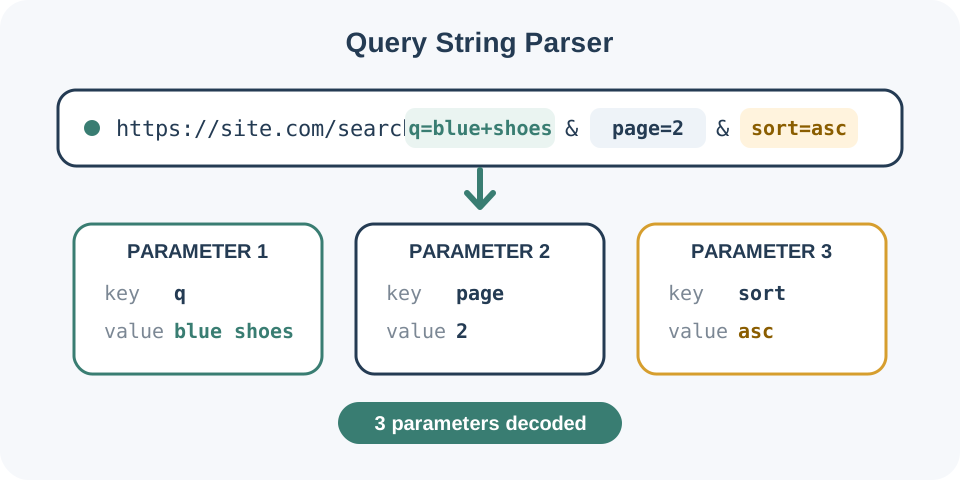
Query String Parser converts the compact query component of a URL into readable JSON. It accepts a full address, a value beginning with ?, or only the raw parameter sequence.
The result preserves every occurrence in order, including its decoded name and value plus the raw transmitted text. A grouped object combines repeated names into arrays while leaving one-time parameters as strings.
Plus signs decode as spaces and percent escapes decode to their represented characters. Bracket-style names such as filter[color] remain exact keys because frameworks disagree about automatic nesting.
Focused controls, predictable output, and a workflow designed around this exact transformation.
See every occurrence in transmission order with decoded and raw forms.
Parse copied browser addresses and isolated parameter strings with the same workflow.
Keep all duplicate occurrences and view their grouped array representation.
Review a structured result without changing the original source.
Practical details about input, output, privacy, limits, and the best way to use this tool.
Yes. The parser extracts the text after the question mark. It also accepts a raw query with or without the leading question mark.
Form-style URL decoding treats + as a space. Encode a literal plus as %2B.
Every occurrence remains in the ordered pairs list. The grouped object converts a repeated name into an array of values.
No. A parameter such as preview= is retained with an empty string value.
No. The exact decoded name filter[color] is preserved. Apply framework-specific nesting rules in the destination system.
No. It creates a separate analysis while keeping the source available.
Avoid active tokens, session identifiers, private callbacks, and customer data. Use synthetic values when possible.
Frameworks make different choices for duplicate keys, semicolon separators, bracket names, and malformed percent escapes.
Repeated tag occurrences remain ordered and are also grouped as an array.
https://example.com/search?q=blue+shoes&page=2&tag=sale&tag=new
parameter_count: 4
q: blue shoes
page: 2
tag: [sale, new]
Percent escapes are decoded and the empty value is preserved.
?utm_source=email&utm_campaign=fallsale&preview=
utm_source: email
utm_campaign: fall sale
preview: ""
The bracket key remains literal while the encoded plus becomes a plus character.
filtercolor=navy&size=m&coupon=SAVE10
filter[color]: navy
size: m
coupon: SAVE+10
The output separates two useful views. pairs preserves each parameter occurrence and includes decoded and raw forms. parameters groups repeated names so duplicates become arrays. parameter_count counts occurrences rather than distinct names.
Input:
https://example.com/search?q=blue+shoes&page=2&tag=sale&tag=new

Decoded parameters:
q: "blue shoes"
page: "2"
tag: ["sale", "new"]
parameter_count: 4Input:
?utm_source=email&utm_campaign=fall%20sale&preview=
utm_source: "email"
utm_campaign: "fall sale"
preview: ""Input:
filter%5Bcolor%5D=navy&size=m&coupon=SAVE%2B10
filter[color]: "navy"
size: "m"
coupon: "SAVE+10"Input:
next=https%3A%2F%2Fexample.com%2Faccount%3Ftab%3Dbilling
next: "https://example.com/account?tab=billing"A raw plus character is decoded as a space. Use %2B when the intended value contains a literal plus. Percent escapes represent bytes, so %20 becomes a space and %5B/%5D become square brackets.
Use URL Decoder when you only need to decode one isolated component. The parser is better when names, values, duplicates, and order must remain connected.
A receiving framework may keep the first duplicate, keep the last, create an array, or interpret square brackets as nested data. This tool exposes the wire-level occurrences and provides a practical grouped view, but the destination application remains authoritative.
Do not remove separators before parsing. When a value contains another URL, inspect both the outer parameter and the decoded inner address. Format the generated structure with JSON Formatter when copying it into documentation or a test fixture.
For parsing and percent-encoding rules, consult the WHATWG URL Standard.