01
Complete component map
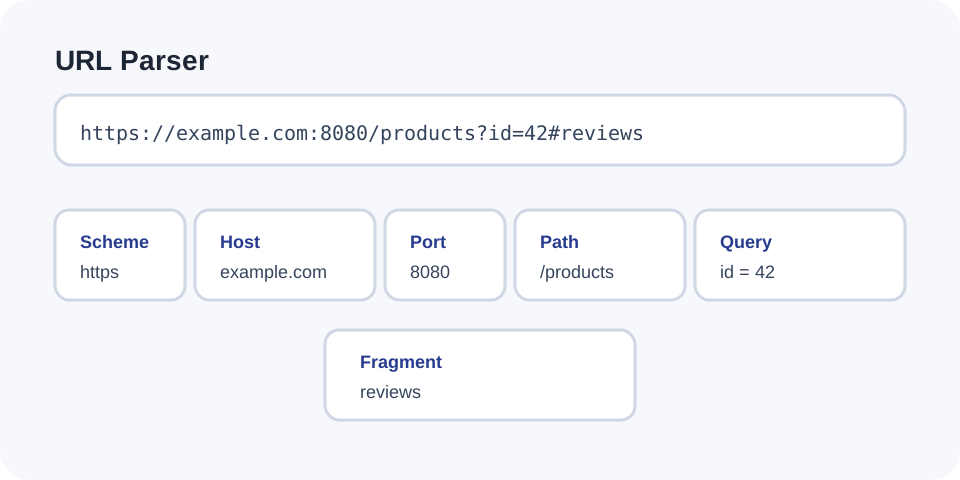
Return scheme, host, port, user, path, query, and fragment in one structured result.
Start typing to search 227 tools.
Split an absolute URL into scheme, host, port, user information, path, query parameters, and fragment.
URL Parser splits an absolute address into its structural components: scheme, host, explicit port, user information, path, query string, parsed query parameters, and fragment. The result is formatted as JSON while the original URL remains unchanged.
Parsing helps diagnose API requests, redirects, campaign links, authentication callbacks, and application routes. It can reveal duplicate parameters, encoded nested URLs, unexpected ports, or fragments that never reach the server.
The tool requires a scheme and host and rejects unencoded spaces or control characters. A successful parse explains structure only; it does not request the destination, confirm reachability, or establish that the URL is safe.
https:// and the hostname.Focused controls, predictable output, and a workflow designed around this exact transformation.
Return scheme, host, port, user, path, query, and fragment in one structured result.
See the raw query beside ordered occurrences and grouped parameter values.
Reject missing schemes, missing hosts, spaces, and control characters before parsing.
The guide distinguishes URL structure from safety, ownership, and network availability.
Practical details about input, output, privacy, limits, and the best way to use this tool.
It returns the scheme, host, explicit port, user, path, query string, query pairs, grouped parameters, and fragment.
Without a scheme, a value such as example.com/page can be interpreted as a relative path rather than a complete URL.
No. Most URLs omit their default port. The parser reports only a port written explicitly in the address.
Normally no. The fragment after # is handled by the browser or client and is not part of the HTTP request target.
Occurrences remain visible in the ordered pair list and are grouped under the same parameter name in the structured result.
No. This operation only analyzes the supplied text.
Yes. Valid structure does not establish ownership, reputation, safety, or intended destination.
No. Query parameters may contain active credentials, tokens, or personal data and should be treated as secrets.
Learn percent-encoding, UTF-8 URLs, query strings, path segments, spaces, plus signs, and double-encoding mistakes.
The scheme appears before the first colon and commonly identifies HTTP or HTTPS. The authority contains the host and may include user information or an explicit port. The path identifies a location within that authority, while the query and fragment add optional state.
Default ports are usually omitted. A missing port therefore does not mean the address is incomplete. User information inside a URL is supported by syntax but should be handled carefully because credentials can leak through logs and browser history.
The query begins after ? and ends before #. A raw query preserves its transmitted representation. Ordered pairs show every name-value occurrence, including duplicates. Grouped parameters make repeated values easier to inspect.
Frameworks do not interpret repeated keys and bracket notation identically. Use the parsed result to understand the input, then verify application-specific nesting and precedence rules in the receiving system.
Reserved characters can change URL structure, so values often use percent encoding. A redirect parameter may contain an entire encoded URL. Parse the outer URL first, identify the specific parameter, and then decode that value separately.
Repeated decoding is risky because a once-decoded percent sequence may become active syntax. Preserve the original string and decode only the layer required by the protocol.
For API failures, compare the scheme, host, port, route path, and parameter names with the API documentation. For campaign links, verify UTM names, duplicates, blank values, and encoded landing-page state. For authentication callbacks, inspect redirect targets without exposing authorization codes or tokens.
A parsed URL can still point to a nonexistent or inaccessible resource. Reachability and HTTP status require a separate network check.
Look-alike domains, unexpected ports, misleading user-information sections, and nested redirects deserve separate review. Parsing does not detect phishing or malware. Avoid sharing URLs containing session identifiers, signed download parameters, password-reset tokens, or private customer information.
Use Query String Parser for parameter-focused output, URL Encoder for one component, URL Decoder for encoded text, or HTTP Header Checker for a public response.
After verifying an API endpoint, translate a copied command with cURL to Fetch or cURL to Python Requests.
Review RFC 3986 and the WHATWG URL Standard for the syntax and browser parsing models relevant to your application.