01
Focused security workflow
Verify a plain-text password against a BCrypt hash safely, understand match results, and troubleshoot invalid hash formats without attempting to decode the hash.
Start typing to search 227 tools.
Verify a plain-text password against a BCrypt hash safely, understand match results, and troubleshoot invalid hash formats without attempting to decode the hash.
BCrypt Verify is a free online security utility for developers, testers, administrators, students, and technical teams. Verify a plain-text password against a BCrypt hash safely, understand match results, and troubleshoot invalid hash formats without attempting to decode the hash.
The source remains visible beside the result so you can confirm every important character before copying the output. Processing uses the reusable Trexmi workspace and does not require an external API request.
For safer testing, use non-sensitive sample values. Do not paste production passwords, private keys, live API secrets, access tokens, or confidential customer information into any environment you do not fully control.
Always verify the selected algorithm, encoding, source bytes, and output format against the destination system. A correctly generated value can still be unusable when the wrong settings were selected.
Focused controls, predictable output, and a workflow designed around this exact transformation.
Verify a plain-text password against a BCrypt hash safely, understand match results, and troubleshoot invalid hash formats without attempting to decode the hash.
Review spaces, line endings, capitalization, and copied values beside the result.
The output is formatted for fast comparison and controlled testing.
Understand important limits before using a result in a real system.
Practical details about input, output, privacy, limits, and the best way to use this tool.
Verify a plain-text password against a BCrypt hash safely, understand match results, and troubleshoot invalid hash formats without attempting to decode the hash.
No. The Trexmi processor runs without an external API request.
Spaces, tabs, and line breaks are part of the input and affect deterministic calculations.
Use non-sensitive test values unless you fully control and trust the installation.
Check the algorithm, encoding, case, line endings, prefixes, and whether the complete source was copied.
No. Hashes, checksums, verification results, and strength scores are not reversible encryption.
No. Follow the destination platform, current standards, code review, testing, and organizational security requirements.
Reduce the input to a safe known test value, verify settings, and restore the original data step by step.
Understand SHA hashes, checksums, HMAC, salts, password hashing, verification, and practical integrity workflows.
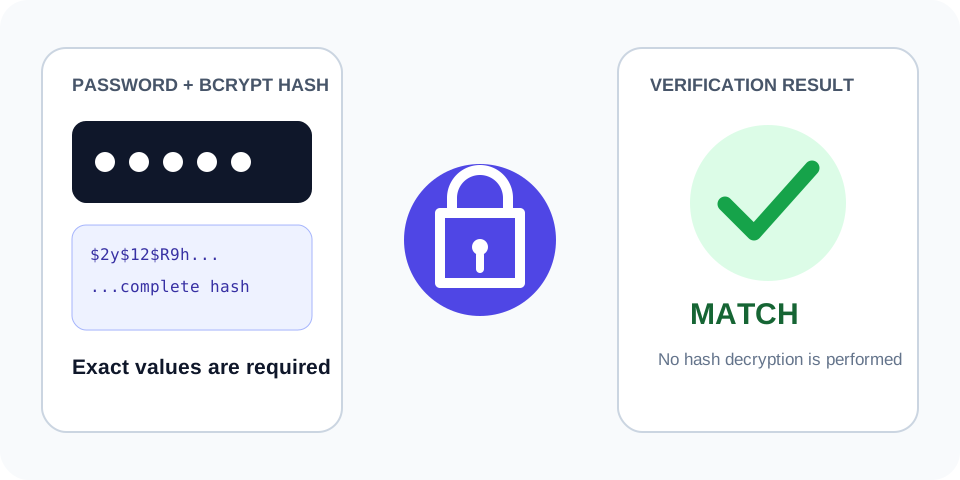
The verifier reads the cost and salt from the stored hash and checks the candidate value.
Plain text plus its complete $2y$ hash
Match
A no-match result does not modify either input.
Different plain text with a valid BCrypt hash
No match
Keep every dollar sign, cost digit, salt character, and checksum character.
A copied BCrypt string shorter than 60 characters
Invalid hash format
BCrypt Verify does not decrypt a password hash. Instead, it reads the cost and salt stored inside the BCrypt string, hashes the supplied password using those same parameters, and performs a secure comparison. A successful result means the password is compatible with that stored hash. A failed result means the password, hash, encoding, or copied value does not match.
A normal BCrypt string includes a version prefix, a two-digit cost value, a salt, and the resulting hash data. It is usually 60 characters long. Common prefixes include $2a$, $2b$, and $2y$. Do not remove dollar signs, shorten the string, or copy only the final characters.
BCrypt uses a random salt. Hashing the same password twice normally creates two different strings, even though both hashes verify the same password. For that reason, applications must use a password verification function instead of generating a new hash and comparing the two strings.
Developers use this tool while testing login migrations, checking seeded accounts, validating framework integrations, reproducing authentication bugs, and confirming that a stored database value was copied correctly. Support teams can also verify a safe test credential without changing a production account.
When moving users between PHP, Laravel, WordPress, Node.js, Python, or another platform, verify known test passwords before switching live traffic. A match confirms that the destination runtime recognizes the existing BCrypt format. It does not prove that every account migrated correctly, so test several controlled fixtures.
Check for invisible spaces, smart quotes, altered line endings, truncated database fields, character encoding differences, and an incomplete hash. Confirm that the password has not been transformed before verification. Passwords are case-sensitive, and every character matters.
Use non-sensitive sample passwords whenever possible. A verification tool should never be used to guess passwords at scale or bypass access controls. Rate limiting, account lockout policies, multifactor authentication, secure password resets, and breach monitoring remain important parts of an authentication system.
BCrypt is intentionally slower than general-purpose hashes. Its cost parameter controls computational work, helping reduce the speed of offline guessing. Choose the cost through performance testing on the actual server environment and follow the current guidance of the framework or security team.
Use this repeatable process to reduce mistakes:
Long hashes, signatures, or source strings can be truncated by database fields, spreadsheets, log viewers, or chat applications. Compare the complete value and expected length.
Trailing spaces, tabs, line breaks, non-breaking spaces, and Unicode normalization can change a result while leaving the visible text almost identical. Use plain text and inspect the boundaries carefully.
Confirm the exact algorithm, case, hexadecimal or decimal representation, and any required prefix. Do not select an option only because the output looks similar.
For additional technical guidance, consult PHP password_verify documentation and OWASP Password Storage Cheat Sheet. These references explain the underlying standards and security considerations in more detail.
Before reusing the output, confirm the original source, selected algorithm, text encoding, whitespace, expected length, output representation, and security requirements. Keep test data separate from production secrets and verify important results in the receiving application.