01
Secure random selection
Characters are selected with a cryptographically secure random source rather than a predictable pseudo-random sequence.
Start typing to search 227 tools.
Generate 1–100 secure random passwords with 8–256 characters, selectable character sets, similar-character removal, and custom exclusions.
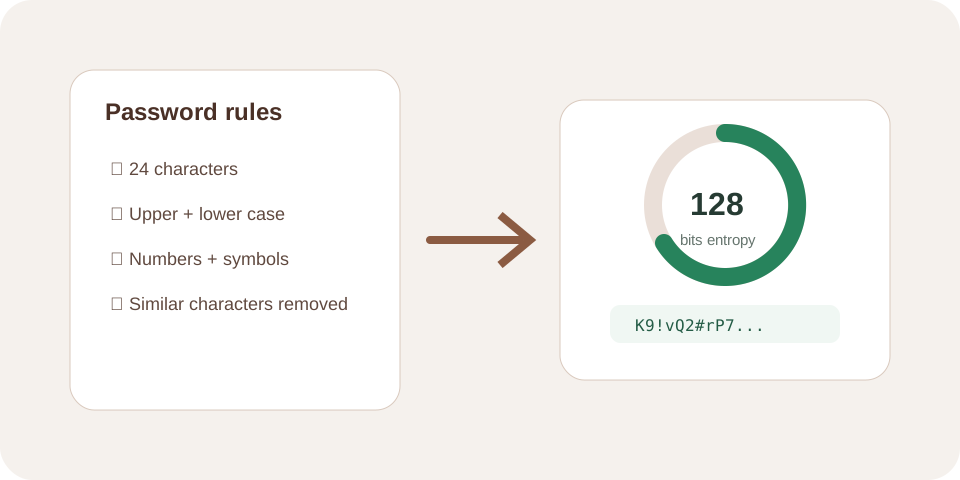
Password Generator Advanced creates 1 to 100 random passwords, each 8 to 256 characters long. Enable lowercase letters, uppercase letters, numbers, and symbols; optionally remove similar characters or provide a custom exclusion list.
Every enabled character group is represented when the selected length allows it, and remaining positions are filled with a cryptographically secure random source before shuffling. The reported entropy is a mathematical pool-size estimate, not proof of account security.
Store generated credentials in a trusted password manager and never reuse one password across services.
Focused controls, predictable output, and a workflow designed around this exact transformation.
Characters are selected with a cryptographically secure random source rather than a predictable pseudo-random sequence.
Set length, quantity, character groups, similar-character handling, and custom exclusions.
Every enabled non-empty group contributes at least one character to each generated password.
Create up to 100 newline-separated results for controlled test or provisioning workflows.
Practical details about input, output, privacy, limits, and the best way to use this tool.
The control accepts 8 through 256 characters per password.
You can create 1 through 100 newline-separated results in one run.
Yes. The processor selects at least one character from every enabled non-empty group, then fills and shuffles remaining positions.
It removes easily confused characters such as uppercase I, lowercase l, digit 1, uppercase O, lowercase o, digit 0, a vertical bar, backtick, and quotes.
Yes. Generation stops if exclusions remove every character from an enabled set or leave an unusably small pool.
No. It estimates the theoretical search space from length and pool size. Storage, reuse, phishing, malware, and service controls also affect security.
Avoid predictable edits. Configure compatible character sets first and generate a new result if requirements change.
Use a trusted password manager or secrets-management system, not chat, source code, screenshots, or a shared spreadsheet.
Use a unique generated value for one account only.
Length 24 · all four character groups
One random 24-character password
Useful when a value must be read aloud or entered manually.
Length 16 · exclude similar characters
A result without easily confused characters
Exclude only characters the receiving system truly cannot accept.
Length 20 · custom exclusions: {}[]
A random password without rejected symbols
The generator builds a pool from the character groups you enable and uses a cryptographically secure random function to select positions. It first contributes a character from each selected group, fills the remaining length from the combined pool, and securely shuffles the result. This avoids a fixed position for numbers or symbols.
Random generation is stronger than predictable substitutions such as replacing a with @ in a dictionary word. It does not protect a password after it is copied into an unsafe document, reused, phished, or exposed by compromised software.
Use the longest password accepted by the destination and keep it unique. Character-set requirements can improve compatibility with a policy, but adequate length creates a much larger search space than short composition tricks. When a service allows long passphrases, several unrelated words may be easier to enter; when a password manager is available, a fully random value is practical.
The tool supports lowercase letters, uppercase letters, digits, and a defined symbol set. Confirm the receiving form’s maximum length and allowed characters before generating the final credential.
Similar-character removal helps when passwords must be printed, read aloud, or typed from another device. Custom exclusions support systems that reject specific punctuation. Every removed character reduces the available pool, so exclude only what the real workflow requires.
If exclusions empty an enabled group or make the combined pool too small, the tool returns an error instead of silently weakening the configuration.
The displayed estimate uses password length and remaining pool size. It assumes each position is selected uniformly and independently. Because one character from each enabled group is required and the output is shuffled, the number is useful for rough configuration comparison but is not a formal proof of effective security.
Account security also depends on server-side password hashing, rate limits, multifactor authentication, reset workflows, session protection, and breach response.
Review the NIST digital identity guidance and the OWASP Authentication Cheat Sheet for current authentication design guidance.
Use Password Strength Checker to inspect a non-sensitive sample, BCrypt Hash Generator for password-storage testing, or Secure Random Generator when raw bytes, hexadecimal, or Base64 output is required.