01
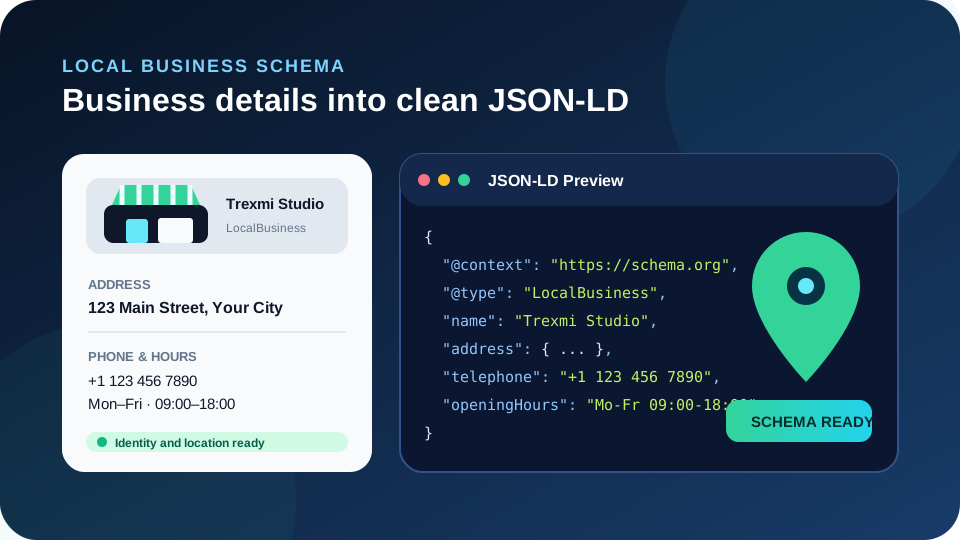
Human-readable location preview
See the business, address, contact details and hours before opening raw JSON.
Start typing to search 227 tools.
Generate LocalBusiness JSON-LD with address, contact, opening hours, price range, and coordinates.
Structured data is ready to review.
Check the human-readable preview, then copy JSON-LD only if it matches the visible page.
Local Business Schema Generator turns customer-facing location details into readable LocalBusiness JSON-LD. Enter the business name, website, type, address, telephone, price range, opening hours, and optional coordinates. The result first shows a visual business card and location summary, while raw JSON-LD stays available in a separate tab.
Local structured data should match the real location. Do not create addresses, opening hours, coordinates, or contact details solely to fill schema fields.
Focused controls, predictable output, and a workflow designed around this exact transformation.
See the business, address, contact details and hours before opening raw JSON.
Required address components and country-code format are checked before generation.
Generate LocalBusiness, Restaurant, Store, ProfessionalService, or MedicalBusiness markup.
No third-party API is required to create the JSON-LD.
Practical details about input, output, privacy, limits, and the best way to use this tool.
It describes a physical or locally serving business entity with properties such as name, website, postal address, telephone, opening hours, and coordinates.
Use a more specific supported subtype when it accurately represents the business. Otherwise LocalBusiness is the safer general type.
No. The generator treats latitude and longitude as optional, but if you add them they should identify the real location accurately.
Add one compact Schema.org-style opening-hours value per line, for example Mo-Fr 09:00-18:00.
This tool focuses on one location at a time so each output can be reviewed against one real business page.
The Local Business Schema Generator creates a Schema.org entity for one real business location. It combines the business type and name with its website and PostalAddress. Optional operational properties include telephone, priceRange, openingHours, and GeoCoordinates. The generated preview makes these relationships readable before the raw JSON-LD is copied.
This is not a business-directory generator and it does not look up or invent location data. The person implementing the markup remains responsible for entering accurate public information.
LocalBusiness is a broad Schema.org type. More specific types can communicate what a location actually is. This focused tool includes Restaurant, Store, ProfessionalService, and MedicalBusiness alongside the general LocalBusiness option. Choose specificity only when it is true. A retail store should not be marked as a restaurant, and a remote-only website should not be given a fictional physical location.
Review the Schema.org LocalBusiness vocabulary for the type hierarchy and available properties. Search platforms can apply additional requirements, so current Google LocalBusiness structured data guidance is also useful when Google Search presentation matters.
The business name should be the public name users recognize, not a keyword-stuffed variation. The address should describe the actual customer-facing location using streetAddress, addressLocality, addressRegion, postalCode, and a two-letter addressCountry value. Telephone should be a real public contact number when supplied.
Consistency matters across the website and other official sources. If a business moves, update visible contact pages and structured data together. Old schema that points to a previous address can create avoidable ambiguity even when the JSON itself remains valid.
Opening hours help describe when a location normally operates. This generator accepts one opening-hours string per line so separate weekday and weekend schedules remain easy to inspect. Use the hours customers actually see, and update them when the regular schedule changes.
Latitude and longitude are optional. When included, both values must be numeric and within valid geographic ranges. Coordinates should point to the actual business location rather than the center of a city or an approximate region. The visual result displays the coordinate pair separately so it is easier to notice a typo before implementation.
First, verify the business type. Second, use the exact public business name. Third, confirm the official website URL. Fourth, check the street address. Fifth, confirm city, region and postal code. Sixth, use the correct country code. Seventh, verify the public telephone. Eighth, review every opening-hours row. Ninth, check latitude and longitude on a map when coordinates are supplied. Tenth, inspect the rendered source after deployment to ensure another SEO plugin has not injected a conflicting LocalBusiness entity.
Do not treat additional properties as automatically better. Accurate minimal data is preferable to a larger object filled with stale or unsupported information. Structured data should stay synchronized with the customer-facing page.
Use Organization Schema Generator for the broader company identity, Schema Markup Generator for other structured-data types, and SERP Snippet Preview to review the page title and description separately.
Local Business Schema Generator creates a clear baseline LocalBusiness entity from real location information. It validates the most important fields, presents the business identity and location visually, and keeps JSON-LD available for implementation after the human-readable review is complete.