01
Visible additions and removals
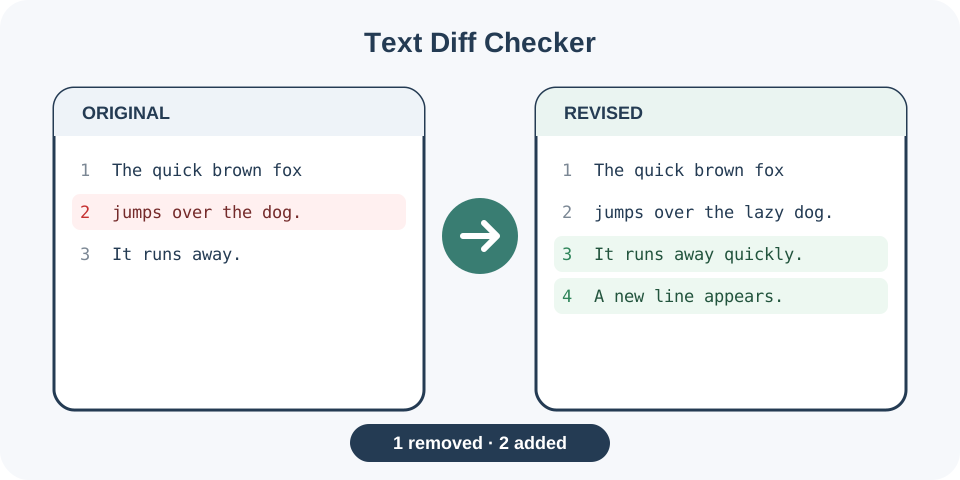
Separate inserted and deleted lines so changes are easier to verify.
Start typing to search 227 tools.
Compare two text versions line by line and identify additions, removals, unchanged lines, and change blocks.
Text Diff Checker online compares two text versions line by line and highlights additions, removals, unchanged lines, and change blocks. Use it as a text compare tool or online diff checker for drafts, configuration files, logs, snippets, and code-like text.
Text Diff Checker compares two versions of text and marks what was added, removed, or left unchanged. Paste the original text in the first field, add the revised version in the comparison field, and generate a line-by-line difference report.
A text diff checker is useful for reviewing edited articles, configuration files, code snippets, product descriptions, policies, translations, data exports, and documentation. It replaces unreliable visual scanning with a structured comparison that keeps both sources available.
Differences in whitespace, capitalization, punctuation, and line breaks may be meaningful. Review the highlighted result in context before accepting or rejecting a change.
Focused controls, predictable output, and a workflow designed around this exact transformation.
Separate inserted and deleted lines so changes are easier to verify.
Keep both text versions available while reviewing the generated comparison.
Find subtle wording, punctuation, and ordering changes without manual scanning.
Use the result as a review aid before publishing, merging, or replacing content.
Practical details about input, output, privacy, limits, and the best way to use this tool.
Text Diff Checker compare two text versions line by line and identify additions, removals, and unchanged content.
Yes. You can use Text Diff Checker online to review representative input before moving the result into your workflow.
No. The source remains available while the generated result appears separately for review.
Tools explain and transform input, but the destination application, server, parser, or publishing platform remains authoritative.
Common Unicode text is preserved where the selected operation and destination format support it.
Reduce the input to the smallest example that reproduces the issue, verify hidden whitespace and delimiters, then restore content gradually.
Avoid passwords, tokens, private keys, personal records, and unreleased content unless you fully trust the processing environment.
Review the beginning and end, confirm that no section is missing, and test critical output in a safe destination environment.
Text Diff Checker separates both inputs into lines and compares their order and content. The algorithm identifies stable lines and reports the surrounding additions or removals. A moved line may appear as one deletion and one addition because its position changed. This is normal for many line-oriented diff formats.
A trailing space, changed quotation mark, different dash, or extra blank line can produce a difference. These changes may be accidental, but they may also affect code, structured data, Markdown, or publishing layout. Enable visible whitespace in the destination editor when a reported difference is hard to explain.
Use Text Diff Checker as a focused review step, then confirm the result with the system that will actually receive or publish the data.
For code, environment files, redirects, and configuration, inspect more than the highlighted line. A small change can alter syntax, indentation, escaping, or behavior elsewhere. The text diff checker helps locate the change, but a linter, parser, test suite, or staging environment should validate the result.
Editors can compare drafts to confirm that required claims, prices, dimensions, legal wording, and calls to action were not lost. Product teams can check supplier updates against existing descriptions. Translators can verify whether paragraphs were added or removed before evaluating language quality.
When the result is difficult to read, compare smaller logical sections. Normalize line endings if content came from different operating systems. Avoid rewrapping paragraphs before comparison because changed line breaks can make an otherwise small edit look extensive. Preserve a clean baseline copy.
Use Text Diff Checker as a focused review step, then confirm the result with the system that will actually receive or publish the data.
Do not paste passwords, private keys, unreleased source code, personal records, or confidential contracts into an environment you do not trust. Replace sensitive values with safe placeholders when the comparison focuses on structure rather than exact secrets.
Confirm that the correct baseline and revised versions were used, inspect the first and last lines, review every addition and removal, and check whether moved content was reported as delete-plus-add. Apply accepted changes to the authoritative document, then run one final comparison to ensure the expected versions now match.
Continue with Regex Tester or Word Counter for a connected workflow.
For standards and implementation details, consult the GNU Diffutils Manual.