01
Detailed match inspection
See complete values, positions, lengths, numbered groups, and named groups for every returned match.
Start typing to search 227 tools.
Test regular expressions with detailed matches, named groups, offsets, line and column positions, execution timing, and highlighted previews.
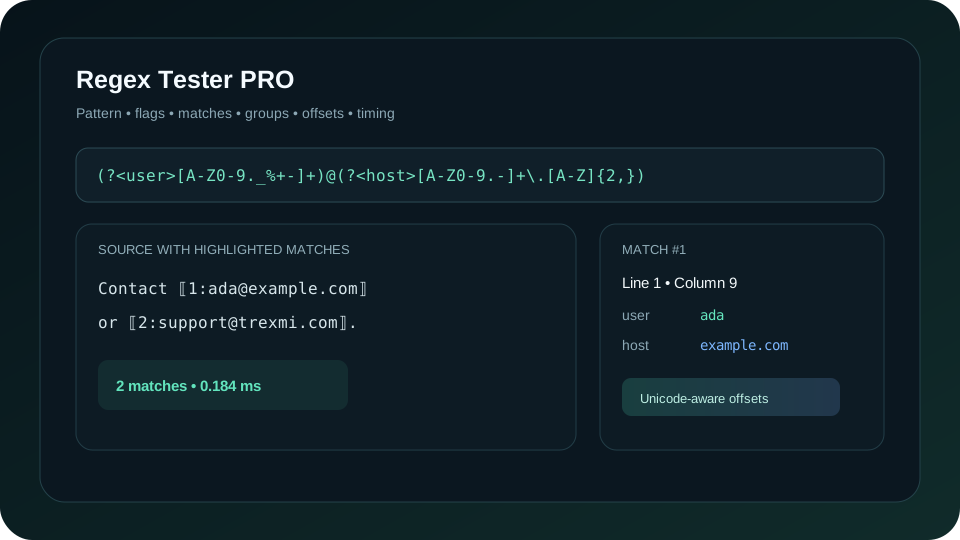
Regex Tester PRO applies a PCRE regular expression to realistic sample text and returns more than a simple match verdict. Each result includes its value, byte offset, Unicode character offset, line, column, length, numbered groups, and named groups.
Enter a raw pattern such as \d+ or a delimited expression such as /(?<user>[A-Z0-9._%+-]+)@(?<host>[A-Z0-9.-]+\.[A-Z]{2,})/giu. The workspace supports global, case-insensitive, multiline, dot-all, extended, and Unicode modes through the flags g, i, m, s, x, and u.
The original source remains visible beside the analysis. That makes optional groups, multiline positions, broad matches, and missed edge cases easier to inspect before the pattern reaches application code.
Focused controls, predictable output, and a workflow designed around this exact transformation.
See complete values, positions, lengths, numbered groups, and named groups for every returned match.
Use raw patterns or familiar delimited expressions with supported flags.
Character offsets and lengths remain useful for Ukrainian, accented text, emoji, and other UTF-8 content.
Review execution time, pattern length, input length, total matches, and truncation status.
Practical details about input, output, privacy, limits, and the best way to use this tool.
Regex Tester PRO is an online regular expression tester that applies a pattern to sample text and returns detailed matches, groups, offsets, line and column positions, timing, and an optional highlighted preview.
Yes. You can use a raw pattern or a delimited expression such as /hello\s+(world)/gi. Supported flags are g, i, m, s, x, and u.
Yes. Named groups are returned separately from numbered groups, including their value, match status, byte offset, character offset, line, column, and length.
The g flag enables global matching and returns all matches up to the selected maximum. Without global mode, the tester returns only the first match.
The result contains both raw byte offsets and Unicode character offsets. This distinction is important because one visible UTF-8 character may use several bytes.
They help locate matches inside logs, configuration files, source code, imported records, and other multiline input without manually counting characters.
Regex engines differ. Trexmi uses the server PCRE engine, while browsers normally use JavaScript RegExp. Always verify important patterns in the actual destination environment.
Enable the option to include unmatched capture groups. Optional groups that did not participate will appear with a null value and matched set to false.
Complex nested quantifiers and ambiguous alternations can cause expensive backtracking. Test representative input, keep patterns focused, and avoid using untrusted patterns in production systems.
No. The source remains separate. The highlighted preview adds visible markers only to the generated result.
Understand regex syntax, character classes, groups, quantifiers, flags, practical examples, and common mistakes.
Named groups and exact source coordinates are returned together.
Text: Order API-2048 accepted
Pattern: \b(?[A-Z]{2,5})-(?\d{3,8})\b
Flags: gu
Match: API-2048
prefix: API
number: 2048
Line: 1
Column: 7
Multiline mode lets line anchors evaluate every log record.
Text:
INFO 200: ready
ERROR 503: upstream unavailable
Pattern: ^ERROR\s+(?\d{3}):\s+(?.+)$
Flags: gmu
Match: ERROR 503: upstream unavailable
code: 503
message: upstream unavailable
Line: 2
Optional groups can remain visible even when they did not participate.
Text: WEB-7315
Pattern: (?[A-Z]+)-(?\d+)(?:-(?[A-Z]+))?
Include unmatched groups: yes
prefix: WEB
number: 7315
suffix: null
matched: false
Regex Tester PRO compiles your expression with the selected PCRE flags and executes it against the supplied UTF-8 text. The response includes the compiled pattern, match mode, execution duration, pattern length, input length, total matches found, returned matches, and whether the maximum-match limit truncated the result.
Each full match records both byte and character measurements. Byte positions are useful when integrating with lower-level systems, while character positions are easier to interpret in human-readable Unicode text.
Return every match up to the selected maximum. Global matching is also enabled when Match mode is set to All matches.
Ignore letter case where supported by the pattern and Unicode mode.
Make the beginning and end anchors operate per line instead of only at the beginning and end of the entire input.
Allow the dot token to match newline characters.
Permit readable whitespace and comments in the pattern. Literal spaces may need escaping.
Treat the pattern and input as UTF-8, enabling safer matching of international text.
Numbered groups are indexed from 1. Named groups use the identifiers declared in patterns such as (?<year>\d{4}). For every participating group, the result reports value, matched state, byte offset, character offset, line, column, byte length, and character length.
Optional groups can be omitted from the result or included with a null value. Including unmatched groups is useful while debugging alternations and optional sections.
(?<user>[A-Z0-9._%+-]+)@(?<host>[A-Z0-9.-]+\.[A-Z]{2,})Use flags giu to find every address while preserving separate user and host groups.
\b(?<year>\d{4})-(?<month>0[1-9]|1[0-2])-(?<day>0[1-9]|[12]\d|3[01])\bThis checks the basic numeric shape but does not prove that every date exists on the calendar.
\s{2,}Useful for locating duplicated spaces, tabs, and line breaks before cleanup.
https?://[^\s<>"']+Useful for extraction tests, but production URL validation usually requires a parser rather than one universal regex.
\b(?<prefix>[A-Z]{2,5})-(?<number>\d{3,10})\bNamed groups make structured identifiers easier to inspect.
Expressions such as (abc or [0-9 cannot compile. Regex Tester PRO returns the underlying compilation message instead of a generic invalid-input response.
Only g, i, m, s, x, and u are accepted in this workspace. JavaScript-only sticky matching and engine-specific modifiers should be tested in their native environment.
Patterns containing optional or zero-length alternatives can match positions without consuming text. Review both value and length when diagnosing these results.
Greedy tokens such as .* may capture much more than expected. Use boundaries, character classes, reluctant quantifiers, and realistic negative test cases.
Nested quantifiers, ambiguous alternations, and repeated backtracking can make some patterns expensive. Limit input size, cap returned matches, avoid running untrusted patterns against sensitive production data, and prefer simpler expressions when a parser is available.
The execution time shown by Regex Tester PRO is useful for comparison, but a fast test on one short sample does not guarantee safe performance on every possible input.
Create common patterns with Regex Builder, transform matches with Regex Replace, or collect matching values with Regex Extractor.
Review the PHP PCRE documentation for the server-side engine and the MDN regular expressions guide when targeting browser JavaScript.