Regex Guide
Regex Guide with syntax, groups, quantifiers, flags, practical examples, debugging, performance, and a reliable Trexmi testing workflow.
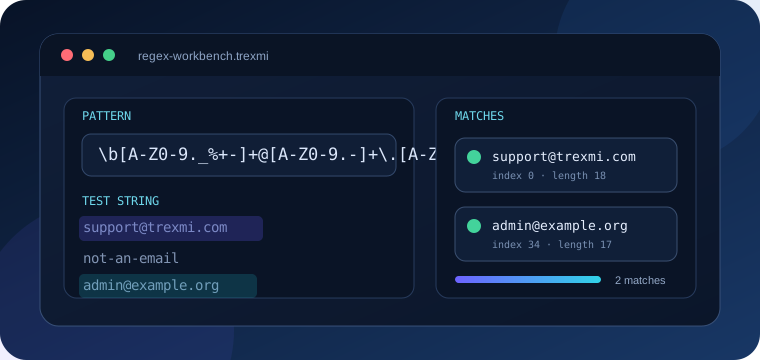
Regex Guide is a practical introduction to regular expressions for developers, analysts, QA teams, and content specialists. It explains regex syntax, character classes, anchors, quantifiers, capture groups, flags, debugging, performance, and realistic testing workflows. Use this Regex Guide when you need to search, validate, extract, or replace structured text without guessing how a pattern behaves.
Tip: Build the smallest useful pattern first. Add groups, alternation, and optional sections only after the basic match is correct.
What is a regex and how does it work?
A regular expression, usually called a regex, describes a text pattern rather than one fixed value. The pattern cat matches those exact letters, while d+ matches one or more digits. A regex engine reads the expression, scans the input, and reports the parts that satisfy the pattern.
Regex is useful for log analysis, form validation, code refactoring, data cleanup, URL extraction, identifier parsing, and many other developer workflows. A focused expression can locate thousands of values in seconds, but an overly broad expression can produce false matches or expensive backtracking.
Regex engines are not identical. Trexmi server-side tools use PCRE-style behavior, while JavaScript, Python, Java, .NET, Go, and database systems support slightly different syntax. Always verify an important production expression in its destination environment. The PHP PCRE documentation and the MDN regex guide are useful external references.
Regex Guide to core building blocks
Literal characters
Most letters and digits match themselves. The expression error finds that exact sequence. Regex metacharacters such as ., *, +, ?, (, ), [, ], {, }, ^, $, and | must be escaped when you want their literal meaning.
Character classes
| Token | Meaning | Example |
|---|---|---|
d |
Digit | d{4} |
w |
Word character | w+ |
s |
Whitespace | s{2,} |
[A-Z] |
Uppercase ASCII letter | [A-Z]{2} |
[^,] |
Any character except comma | [^,]+ |
Anchors and boundaries
^ and $ anchor a pattern to the beginning and end of the input or line, depending on flags. b marks a word boundary. Anchors are essential when validating a complete value instead of searching inside larger text.
Regex quantifiers and repetition
Quantifiers control repetition. Use + for one or more, * for zero or more, ? for optional content, {3} for exactly three, and {2,5} for a bounded range. Greedy quantifiers consume as much as possible. Adding ? after a quantifier usually makes it reluctant.
d{4}-d{2}-d{2}This pattern finds the numeric shape of an ISO-style date. It does not prove that every matched date exists on the calendar.
Warning: Nested quantifiers such as
(a+)+can trigger catastrophic backtracking on long input. Keep repetition specific and test worst-case data.
Capture groups, named groups, and alternation
Parentheses create groups. Numbered capture groups make portions of the match available separately. Named groups improve readability and make downstream processing easier:
(?<year>d{4})-(?<month>d{2})-(?<day>d{2})Use (?:...) when grouping is needed without capturing. Alternation uses |, as in jpg|png|webp. Group alternatives carefully because operator precedence can broaden a regex unexpectedly.
Regex Guide to common flags
- g returns all matches instead of stopping after the first.
- i enables case-insensitive matching.
- m changes how line anchors behave in multiline input.
- s allows dot to match newline characters.
- u enables Unicode-aware processing where supported.
- x allows readable spacing and comments in PCRE-style patterns.
Practical regex examples
Email-like values
[A-Za-z0-9._%+-]+@[A-Za-z0-9.-]+.[A-Za-z]{2,}This catches common email-shaped values for extraction or basic checks. A production signup flow should also normalize the address and verify ownership.
URLs
https?://[^s<>"']+This is useful for finding URL-like text. For strict URL validation, use a URL parser because complete URL syntax is too complex for one short universal expression.
UUID values
b[0-9a-fA-F]{8}-(?:[0-9a-fA-F]{4}-){3}[0-9a-fA-F]{12}bOrder identifiers
b(?<prefix>[A-Z]{2,5})-(?<number>d{3,10})bA reliable Regex Guide workflow
- Collect representative positive examples.
- Add negative examples that must not match.
- Build the smallest useful expression.
- Test flags, boundaries, and capture groups.
- Use replacement or extraction only after matching is correct.
- Test long and adversarial input for performance problems.
- Verify the final expression in the destination language.
Start with Regex Builder for common patterns. Inspect matching behavior in Regex Tester PRO. Transform matches with Regex Replace, and collect matching values with Regex Extractor. These internal tools turn the Regex Guide into a practical workflow rather than a theory-only article.
Common regex mistakes
Using an unanchored validator
A pattern may find a valid fragment inside an invalid value. Add ^ and $ when the whole input must conform.
Overusing dot-star
.* is convenient but often captures too much. Prefer a specific character class and a clear delimiter.
Forgetting to escape user input
Text inserted dynamically into a regex can change the pattern. Escape untrusted literal input before compilation.
Ignoring Unicode
ASCII-only character classes may reject valid international text. Use Unicode mode and engine-appropriate properties where multilingual input is expected.
Regex performance and safety
Performance depends on pattern structure, engine behavior, and input length. Ambiguous alternatives and nested repetition can make execution time grow rapidly. Limit input size, cap the number of returned matches, and avoid executing untrusted expressions against sensitive production data.
Pro tip: A fast result on one short sample does not prove that a regex is safe. Test long strings that almost match, because near-misses often reveal backtracking problems.
When not to use regex
Use a dedicated parser for JSON, XML, HTML, URLs, email delivery rules, programming languages, and other structured formats when correctness matters. Regex is excellent for focused text patterns, but it is not always the safest replacement for a grammar-aware parser.
Regex Guide summary
A dependable regex starts with a narrow goal, realistic examples, clear boundaries, and careful testing. Use named groups when results need structure, choose flags deliberately, avoid ambiguous repetition, and verify the final expression in the target engine. Trexmi tools help separate pattern creation, testing, replacement, and extraction so each step remains easy to inspect.
Practice what you learned
Related Trexmi tools
Open a focused workspace and test the patterns from this guide.Clear answers
Frequently asked questions
What is a regex?+
A regex is a pattern language used to locate, validate, extract, or replace text.
Which regex engine does Trexmi use?+
Trexmi server-side regex tools use PCRE-style behavior. Verify important expressions in the final destination environment.
Can regex validate every email address?+
A practical regex can catch common shapes, but complete validation should also use normalization and ownership verification.
Why is my regex slow?+
Nested quantifiers, ambiguous alternatives, and large input can cause expensive backtracking. Simplify the pattern and constrain input.
Should I use regex to parse JSON or HTML?+
Use a dedicated parser when correctness matters. Regex is better for focused text patterns than full structured grammars.
How should beginners test a regex?+
Start with positive and negative examples, test one feature at a time, inspect capture groups, and verify the final pattern in the destination engine.
Continue learning