01
Create valid JSON string content
Quotes, slashes and control characters are escaped according to JSON string syntax.
Start typing to search 227 tools.
Escape quotes, backslashes, line breaks, tabs and Unicode-safe text for use inside JSON string values, API payloads and configuration files.
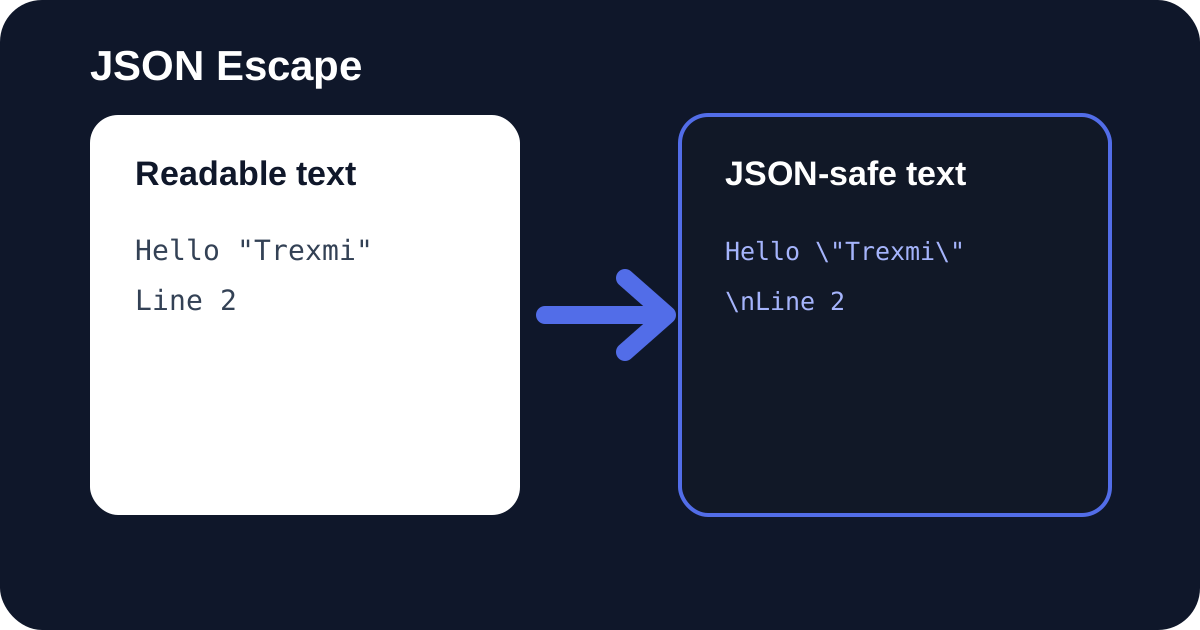
JSON Escape converts ordinary readable text into safe content for a JSON string value. The JSON Escape tool protects quotation marks, backslashes, line breaks, tabs, carriage returns, and other control characters that would otherwise break a JSON document. Unicode letters remain readable, so Ukrainian, accented Latin text, Asian scripts, and emoji can be prepared for APIs without unnecessary character replacement.
Use JSON Escape when a message, template, file path, SQL fragment, log entry, or multiline block must be embedded inside an API payload or configuration value. The tool returns escaped string content without adding outer quotation marks. This makes the result easy to paste between the quotes of an existing property. For a complete JSON document, use JSON Formatter or JSON Validator instead of escaping the entire structure.
Focused controls, predictable output, and a workflow designed around this exact transformation.
Quotes, slashes and control characters are escaped according to JSON string syntax.
Ukrainian, accented and other Unicode text remains readable instead of being unnecessarily converted.
Escape copied messages, templates and multiline text before placing them in request bodies.
The text is handled by the Trexmi tool workflow without an external escaping service.
Practical details about input, output, privacy, limits, and the best way to use this tool.
It converts readable text into escaped content suitable for a JSON string value.
No. It returns the escaped content without outer quotes.
Unicode text is preserved when possible while control characters and JSON syntax characters are escaped.
Yes. Line breaks become \n sequences.
A literal backslash inside a JSON string is represented by two backslashes.
The tool can process any text, but complete JSON documents should normally be formatted or validated instead.
Paste it into JSON Unescape to restore readable text.
JSON.stringify serializes a complete JavaScript value and adds outer quotes for strings. This tool returns escaped inner string content for direct insertion into an existing JSON property.
Yes. Emoji and other valid Unicode characters are preserved unless the receiving system explicitly requires ASCII-only Unicode escapes.
No. Escaping only makes text syntactically valid inside JSON. It does not encrypt, anonymize, or sanitize data for HTML, SQL, or shell commands.
Learn JSON objects, arrays, value types, validation, formatting, parsing, API workflows, and common syntax errors.
A JSON string begins and ends with double quotation marks. A literal quotation mark inside that value must therefore be represented as \". A literal backslash becomes \, a newline becomes \n, a tab becomes \t, and a carriage return becomes \r. JSON Escape applies these standard transformations while preserving the original meaning of the text.
The JSON Escape tool is deliberately different from URL encoding, HTML entity encoding, and Base64. URL encoding prepares data for a URL component, HTML encoding protects text placed in markup, and Base64 converts bytes into a transport alphabet. JSON escaping only prepares characters for the grammar of a JSON string. Choosing the correct operation prevents double encoding and avoids confusing output.
Developers commonly use JSON Escape for customer messages, stack traces, Markdown fragments, Windows paths, regular expressions, and snippets copied from configuration files. A message such as She said "Hello" becomes safe to place inside a JSON property. A multiline support note receives explicit \n markers, while a path such as C:\Tools\Trexmi receives doubled backslashes.
JSON Escape is also useful when preparing fixtures for automated tests. A test can store the exact serialized value expected from an API without manually counting slashes. When reviewing an existing escaped value, open JSON Unescape to restore the readable form before editing it.
API request bodies often contain user-generated descriptions, error messages, prompts, or templates. Pasting these values directly into raw JSON can create invalid syntax when the text contains quotes or physical line breaks. Escape the value first, paste it into the intended property, and then run the complete request body through JSON Validator. This two-step workflow catches both string-level and document-level mistakes.
Configuration formats sometimes contain JSON strings inside another format. Examples include environment variables, CI settings, command arguments, and database columns that store serialized values. In these cases, identify how many encoding layers exist. Escape once for each JSON string layer, but do not repeatedly process a value without understanding the destination because double escaping changes \n into \n.
The most frequent mistake is escaping a full JSON object instead of a single string value. That produces a quoted representation of the document rather than a usable object. Another mistake is adding outer quotes twice. JSON Escape returns the inner escaped content, so the surrounding quotes should come from the final property itself.
Copying already escaped content into the tool can also create double escapes. Check whether the source displays visible sequences such as \", \n, or \u041f. When those sequences already represent encoded characters, use JSON Unescape first. Also remember that JSON does not support JavaScript-only escapes such as \x41.
Keep the original readable text while testing so the escaped output can be compared against it. Validate the complete payload after insertion, especially when the value is combined with manually written JSON. Use UTF-8 throughout the application, preserve Unicode unless a receiving system explicitly requires ASCII-only escapes, and avoid changing slash characters unless the destination has a special requirement.
For repeatable workflows, generate JSON with a real serializer in application code rather than concatenating strings manually. This online JSON Escape tool is ideal for debugging, examples, migrations, and one-off data preparation, while production applications should rely on their language’s JSON encoder.
Escaping is a syntax operation, not encryption or sanitization for every context. A JSON-safe string may still contain HTML, SQL, shell syntax, or private information. Apply the security rules required by the final destination. Never publish access tokens, passwords, private keys, or personal information in examples. JSON syntax and escaping rules are defined by RFC 8259.
Continue working with related Trexmi tools: use JSON Unescape to reverse escaped text, JSON Validator to verify a complete document, JSON Formatter to improve readability, and JSON Viewer to inspect nested values.