01
Focused workflow
One clear operation produces an easy-to-review result.
Start typing to search 126 tools.
Test regular expressions against sample text.
Regex Tester is a focused online utility that helps you test a regular expression against realistic text and inspect every match, capture group, and character offset.
The tool keeps the original input visible and places the result in a separate review area. This makes it easier to verify complete values, compare changes, catch malformed input, and copy only the result you intend to use.
Use realistic sample data, review the beginning and end of the output, and test production-sensitive results in a safe environment before deployment.
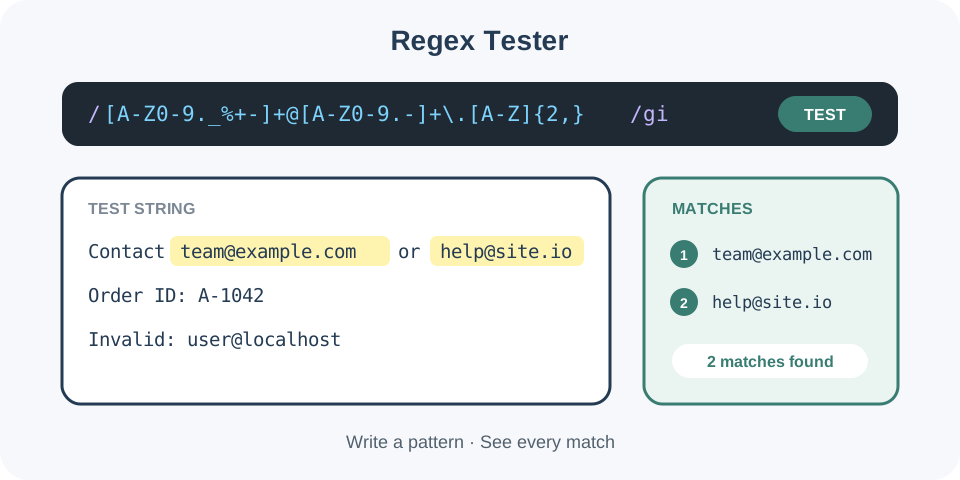
Focused controls, predictable output, and a workflow designed around this exact transformation.
One clear operation produces an easy-to-review result.
Original input remains available for comparison.
The separate result can be reviewed before copying.
Clear checks reduce avoidable mistakes.
Practical details about input, output, privacy, limits, and the best way to use this tool.
It helps you test a regular expression against realistic text and inspect every match, capture group, and character offset.
The tool can be used within the active Trexmi plan limits.
No. The result is generated separately so you can compare it with the source.
Yes. Common non-Latin characters and symbols are preserved where the selected operation allows them.
Malformed syntax, incomplete values, unsupported options, hidden characters, or exceeded limits can cause validation errors.
Yes within the active plan limits. Start with a representative sample when troubleshooting.
Yes. Always test important output in the destination application before production use.
Avoid passwords, private keys, tokens, personal records, and production secrets unless you fully trust the environment.
It helps you test a regular expression against realistic text and inspect every match, capture group, and character offset.
The tool can be used within the active Trexmi plan limits.
No. The result is generated separately so you can compare it with the source.
Yes. Common non-Latin characters and symbols are preserved where the selected operation allows them.
Malformed syntax, incomplete values, unsupported options, hidden characters, or exceeded limits can cause validation errors.
Yes within the active plan limits. Start with a representative sample when troubleshooting.
Yes. Always test important output in the destination application before production use.
Avoid passwords, private keys, tokens, personal records, and production secrets unless you fully trust the environment.
Regex Tester reads the supplied values, applies one clearly defined operation, and returns a separate result. The source is not silently replaced, which supports safer comparison and correction.
The processor validates the most important input conditions and reports understandable errors instead of returning an incomplete result.
Use Regex Tester during development, content preparation, testing, troubleshooting, migration, documentation, and quality assurance.
Representative examples are more useful than tiny artificial samples because they reveal Unicode, whitespace, nesting, quoting, and boundary issues.
Copy the complete source and preserve an untouched backup. Remove accidental rich-text formatting and confirm that the first and final characters are present.
For confidential workflows, replace real credentials, customer details, tokens, and production identifiers with safe test values.
Inspect every important section rather than only the first line. Verify formatting, data types, order, capitalization, delimiters, offsets, and any security-sensitive values.
Test the result in the receiving application when compatibility matters because that system remains authoritative.
Reduce failing input to the smallest example that reproduces the problem, then restore content gradually.
This method isolates the exact line, symbol, option, or value responsible for unexpected output.
Browser utilities simplify routine work but do not replace standards documentation, security review, or destination-specific validation.
Do not paste private keys, passwords, personal records, or production secrets into an environment you do not trust.
Continue with the first related tool or the second related tool.
Use the MDN regular expressions guide and the ECMAScript RegExp specification when you need authoritative syntax, flags, matching behavior, and compatibility details.