The example shows exactly what changes and what remains untouched.
First release note.

Second paragraph includes 42 details.
First release note.

Second paragraph includes 42 details.
Start typing to search 126 tools.
This sentence case converter changes irregular capitalization into a sentence-style pattern while keeping the original text available for comparison.
Each example shows a realistic source value and the result produced by this specific tool.
The example shows exactly what changes and what remains untouched.
First release note. Second paragraph includes 42 details.
First release note. Second paragraph includes 42 details.
The example shows exactly what changes and what remains untouched.
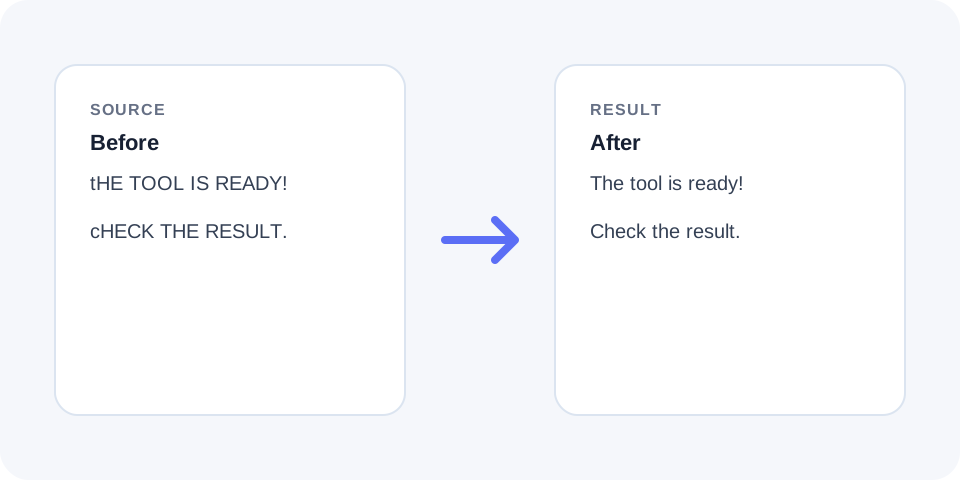
THIS IS THE FIRST SENTENCE. here is the SECOND!
This is the first sentence. Here is the second!
sentence case converter This sentence case converter changes irregular capitalization into a sentence-style pattern while keeping the original text available for comparison.
The workspace keeps the source available, applies one clearly named operation, and displays the result separately. This makes the output easier to compare before it is published, imported, shared, or reused.
Use the complete source whenever possible, verify context-sensitive values, and retain a backup for important documents or structured data.
Focused controls, predictable output, and a workflow designed around this exact transformation.
Capitalizes sentence beginnings while reducing unnecessary all-caps or title-style capitalization.
Compare the converted result with the source before replacing important copy.
A separate output helps identify proper nouns or acronyms that require manual restoration.
Prepare headings, notes, descriptions, and imported text for editorial review.
Practical details about input, output, privacy, limits, and the best way to use this tool.
Sentence case normally capitalizes the first letter of a sentence while other words use regular lowercase unless they are proper nouns.
Not reliably. Names, brands, places, and specialized terms may need manual correction.
Acronyms can be lowercased and should be reviewed after conversion.
Common punctuation is recognized, but abbreviations and unusual formatting can create ambiguous boundaries.
No. Numeric values are not converted by case operations.
Yes, when the heading should follow sentence-style capitalization rather than title case.
No. It changes capitalization only and does not rewrite grammar or wording.
Use the source copy; capitalization information removed by conversion cannot be inferred perfectly.
Sentence case normally capitalizes the first letter of a sentence while other words use regular lowercase unless they are proper nouns.
Not reliably. Names, brands, places, and specialized terms may need manual correction.
Acronyms can be lowercased and should be reviewed after conversion.
Common punctuation is recognized, but abbreviations and unusual formatting can create ambiguous boundaries.
No. Numeric values are not converted by case operations.
Yes, when the heading should follow sentence-style capitalization rather than title case.
No. It changes capitalization only and does not rewrite grammar or wording.
Use the source copy; capitalization information removed by conversion cannot be inferred perfectly.
Sentence case normalizes capitalization so sentence beginnings are uppercase and ordinary words generally use lowercase.
The operation focuses on letter case and does not rewrite vocabulary, punctuation, or sentence structure.
Periods, question marks, and exclamation marks commonly indicate where a new sentence begins.
Abbreviations, initials, decimal numbers, and copied formatting can make boundaries ambiguous, so the output still needs review.
Automatic case conversion cannot reliably identify every name, product, organization, or geographic term.
Restore required capitalization manually after the bulk conversion.
Terms such as API, HTML, model codes, and mixed-case product names can lose their intended formatting.
Create a checklist of protected terms when processing long or technical documents.
Sentence case is often used for headings, interface labels, and editorial styles that avoid capitalizing every major word.
Confirm the style guide of the destination because some sites require title case instead.
Scan sentence beginnings, proper nouns, abbreviations, and quoted text after conversion.
Keep the original source until the corrected sentence-case version has been approved.
The sentence case converter is useful for imported descriptions, all-uppercase notes, headings, lists, and drafts with inconsistent capitalization. It normally capitalizes sentence beginnings and lowers unnecessary capital letters elsewhere. Because software cannot always identify proper names, brands, abbreviations, product codes, or acronyms, review those items manually. The sentence case converter does not rewrite wording or correct grammar; it only applies a capitalization pattern. Process a small sample first, compare the converted output with the source, and restore any intentional capitalization before publishing or importing the text.
sentence case converter keeps the source and result separate so the transformation remains easy to inspect, explain, and reverse when necessary.
Continue with a related utility, another focused tool, or a complementary workflow. Keeping operations separate makes changes easier to understand and reverse.
For general string-processing concepts, consult the MDN String reference.